Spotify Codes (2026 Guide): What They Are, How to Scan & How Artists Use Them
Learn what Spotify Codes are, how to create and scan them, and when artists should actually use them to make their music easier to access.

Updated for 2026: Our guide reflects how Spotify Codes currently work, including how to create, scan, and use them effectively as an artist.
For independent artists, finding ways to connect with fans in both the digital and physical world can feel overwhelming. Between juggling releases, social media, and live shows, it is easy to overlook simple tools that can make a difference.
One of the most overlooked features Spotify offers is Spotify Codes. If you’ve ever seen the barcode-like graphic under a song and wondered what Spotify Codes are or how Spotify Codes work, you’re not alone. While Spotify continues to roll out new tools for artists (as covered in our guide to Top 5 Spotify Features), many musicians still don’t fully understand how Spotify Codes work or when to use them effectively...
What Is a Spotify Code?
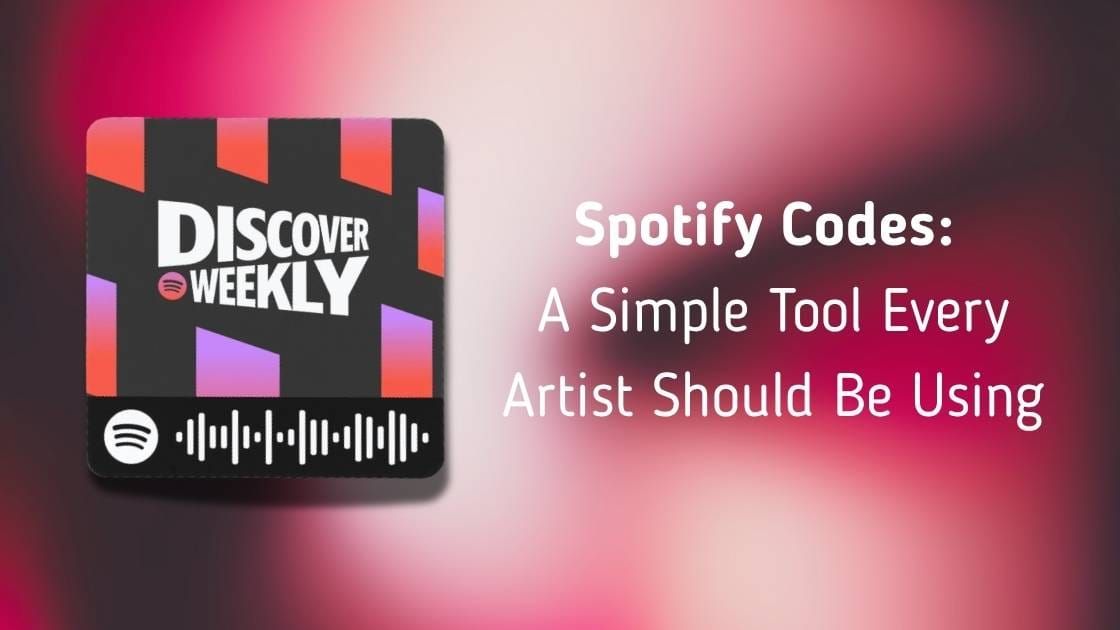
A Spotify Code is a scannable image that links directly to content inside the Spotify app. Each code is unique and can point to:
- A song
- An album
- A playlist
- An artist profile
When scanned with the Spotify app, the content opens instantly without needing to search or type anything. Think of it as Spotify’s version of a QR code, designed specifically for music.
Warum Spotify für Künstler wichtig sind
Spotify Codes are best known as a convenience tool, not a growth hack. Instead of replacing links or promotions, they work best as part of a larger strategy (especially if you're learning how to promote your music online as an independent artist, which we break down in our guide on How to Promote Your Music Online)
For example, instead of asking someone to search your name later, a Spotify Code lets them access your music instantly with a quick scan. This can be especially useful in real-world situations such as live shows, networking, or printed materials where clickable links are unavailable.
Kreative Wege zur Verwendung von Spotify
Künstler können Spotify Codes auf mehr als nur einen Link zu einem Spotify verwenden. Hier sind ein paar Ideen für den Anfang:
- Bei Live-Veranstaltungen: Drucken Sie Ihren Code auf Plakaten, Flyern oder sogar Aufklebern aus, die Sie verteilen können. Fans, die dich live entdecken, können den Code scannen und deine Musik sofort speichern.
- On Social Media: Post your code as an image on Instagram, TikTok, or Twitter. Since it looks more eye-catching than a standard link, it encourages curiosity and clicks. Pairing this with your existing social content can make your posts more interactive and visually engaging.
- Beim Networking: Verteilen Sie nicht nur eine Visitenkarte, sondern fügen Sie Ihren Code bei. Das zeigt Professionalität und macht es den Leuten leicht, sich Ihre Arbeit sofort anzuhören.
Wie man einen Spotify erstellt
Before creating your code, make sure your profile is fully optimized (as outlined in our guide on How To Set up Your Spotify Artist Profile), since this is what listeners will see after scanning.
When you're ready, creating a Spotify Code scan only takes a few minutes. Here's how you can create your own:
- Öffnen Sie Ihr Spotify und gehen Sie zu dem Song, dem Album, der Wiedergabeliste oder dem Künstlerprofil, das Sie teilen möchten.
- Tippen Sie auf das Drei-Punkte-Menü neben dem Inhalt.
- Wählen Sie Freigeben und kopieren Sie den Link.
- Gehen Sie zu SpotifyCodes.com, fügen Sie Ihren Link ein, und verwenden Sie den Spotify , um Ihren Code zu erstellen.
- Passen Sie das Design an Ihre Marke an und laden Sie es zur Verwendung herunter.
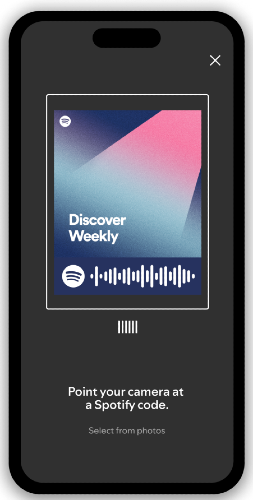
How to scan a Spotify Code
Scanning a Spotify Code only takes a few seconds and can be done directly inside the Spotify app:
1) Open the Spotify app
2) Tap the search tab
3) Tap the camera icon in the top right
4) Point your camera at the Spotify Code
5) The song, album, or artist will open instantly
This makes Spotify Codes one of the fastest ways to access music without typing or searching.
When Spotify Codes Are Less Effective
While Spotify Codes are useful, they aren't always the best option. They tend to be less effective:
- In social media captions, where links are easier to tap
- When targeting new audiences who aren't familiar with you
- On platforms where users cannot easily scan from the same device
In many cases, a standard link or smart link will still be the fastest way for someone to access your music.
Turning Scans into Listeners
The main benefit of Spotify Codes is immediacy. When someone is interested in your music in the moment, removing extra steps increases the chance they will actually listen.
For independent artists, this can help capture attention at key moments, such as after a live performance or a conversation. While a single scan will not transform your growth, consistently making your music easier to access can support long-term fan building.
For artists focused on growth, combining tools like Spotify Codes with proven strategies for getting more Spotify streams organically (as outlined in our guide, How to Get More Spotify Streams: Guide to Organic Growth) will be far more effective.
Spotify Codes vs QR Codes
While Spotify Codes and QR codes may look similar, they serve different purposes:
- Spotify Codes only work inside the Spotify app
- QR Codes can link to any website or platform
For artists, Spotify Codes are more direct for music discovery, while QR codes are more flexible for marketing across platforms. In many cases, using both together can be the most effective strategy.
Abschließende Überlegungen
Spotify Codes are a simple tool designed to make it easier to access music. They will not replace promotion or drive streams on their own, but they can be a useful addition when used in the right context. If your goal is to remove friction and make it easier for interested listeners to find your music, Spotify Codes are worth incorporating into your overall strategy.
FAQs
Was ist ein Spotify ?
A Spotify Code is a scannable image that opens a specific song, album, playlist, or artist profile inside the Spotify app.
Kann ich meinen Spotify individuell anpassen?
Yes. When generating your code at SpotifyCodes.com, you can adjust the color, size, and format to fit your branding.
Wo sollte ich Spotify Codes verwenden?
Sie funktionieren am besten auf physischen Gegenständen wie Aufklebern, Flyern, Postern oder Waren, aber auch in digitalen Bereichen wie Social-Media-Posts, E-Mail-Newslettern oder Ihrer Website.
Laufen Spotify Codes ab?
Nein. Solange der von Ihnen verwendete Spotify noch aktiv ist, wird Ihr Code weiterhin funktionieren.
Können Spotify kostenlos erstellt werden?
Ja. Sie können Spotify kostenlos über SpotifyCodes.com erstellen und herunterladen.
How do I create a Spotify code?
Go to SpotifyCodes.com, paste your Spotify link, and download your custom code.
Do Spotify Codes increase streams?
No. Spotify Codes do not directly increase streams or algorithmic reach. They simply make it easier for listeners to access your music quickly.
Möchten Sie Ihre Musik promoten?
Use our Spotify Playlist Submissions or TikTok Promotion service.