How to Get Verified on Spotify (2026): Complete Step-by-Step Artist Verification Guide
Getting verified on Spotify builds credibility and unlocks powerful tools. Here’s exactly how to claim your Spotify for Artists profile step by step.

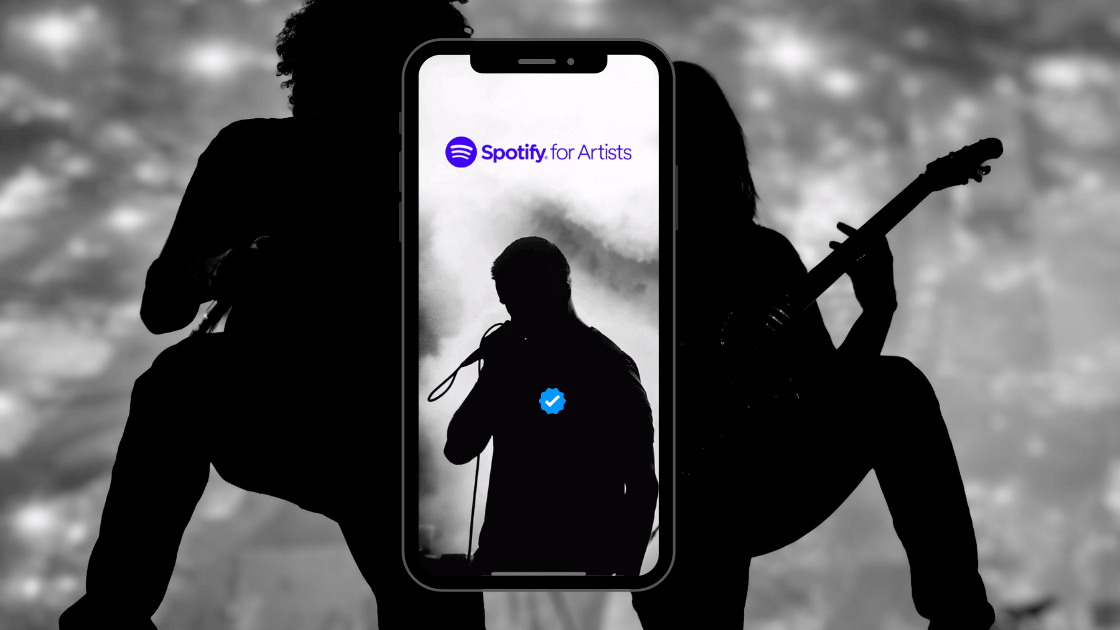
Updated for 2026: Musicians need every advantage to stand out in a crowded market. One advantage is getting verified on Spotify.
With over 600 million active users, including 230 million premium subscribers, Spotify is a key platform for artists seeking increased visibility and credibility.
Getting that coveted Spotify blue tick next to your name can significantly boost your presence on the platform. Here’s a comprehensive guide to help you navigate the verification process on Spotify.
Schritt 1: Veröffentlichen Sie Ihre Musik auf Spotify
Before you can get a verified profile, your music needs to be on Spotify. This involves uploading your tracks through a music distributor such as Symphonic, CD Baby, or DistroKid. Ensure your music is live on Spotify before proceeding with the next steps.
in to
If you're using DistroKid, you might wonder how long it takes DistroKid to upload to Spotify. Typically, it takes a few days, so plan accordingly.
Step 2: Log in to your Spotify Account
To start the verification process, you'll need to go to the Spotify for Artists login. You can log in with your existing Spotify credentials or create a new account if you don't have one.
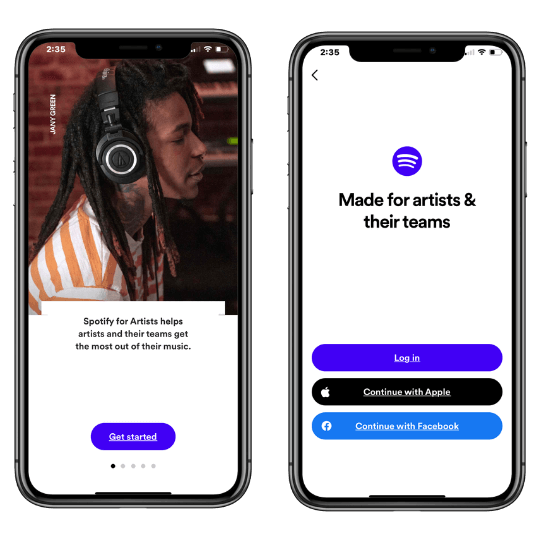
Step 3: Claim Your Artist Profile on Spotify for Artists
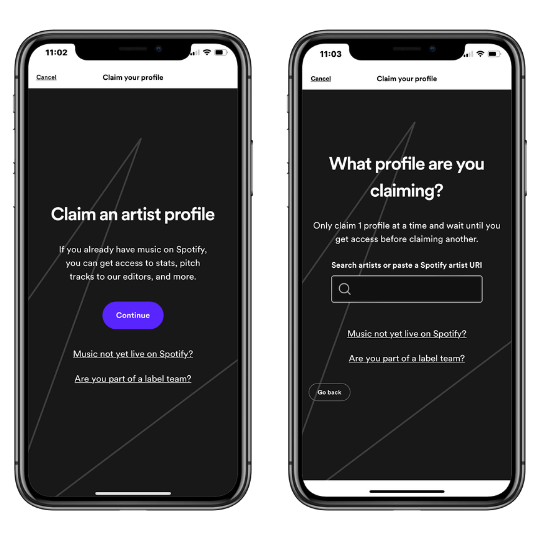
After logging in, search for your artist profile by typing in your artist name or pasting a URL link to your Spotify profile. This step ensures that Spotify links the correct profile to your account. Double-check to make sure all the information matches your artist profile.
Spotify will then ask you to identify yourself as an artist, manager, or label team member, and then you can claim your Spotify artist profile.
Schritt 4: Zusätzliche Informationen bereitstellen
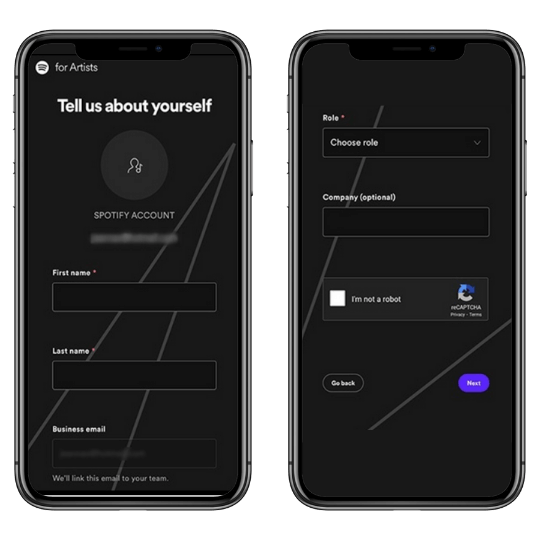
After selecting your artist account, Spotify will ask for some basic information to complete your verification. This includes:
Vor- und Nachname
Geschäftliche E-Mail
Rolle (Künstler, Manager usw.)
Unternehmen (falls zutreffend)
Diese Informationen helfen Spotify , Ihre Identität zu überprüfen und Sie mit dem richtigen Profil zu verbinden.
Step 5: Verify Your Spotify For Artists Submission
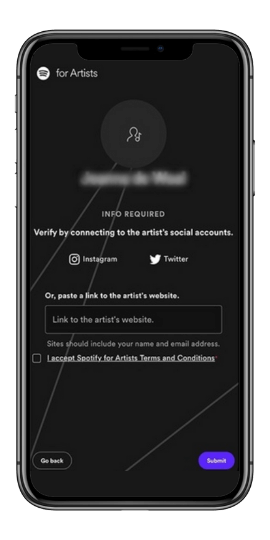
To finalize your verification, you must connect your Spotify account to your social media profiles (Instagram or Twitter) or provide a link to your official artist website.
This step confirms your identity and ensures that you are the legitimate owner of the artist profile. After connecting your social media or website, click “Submit” to complete the process.
What to Expect After Submitting Your Spotify For Artists Verification Request
Nachdem Sie Ihren Verifizierungsantrag eingereicht haben, dauert es in der Regel ein paar Tage, bis Spotify ihn überprüft und genehmigt hat. Du weißt, dass du verifiziert wurdest, wenn das blaue Spotify Symbol neben deinem Künstlernamen in deinem Profil erscheint. Wenn Ihr Antrag abgelehnt wird, gibt Spotify in der Regel einen Grund an, der es Ihnen ermöglicht, alle Probleme zu korrigieren und sich erneut zu bewerben.
Vorteile der Verifizierung auf Spotify
Getting the verified tick on Spotify offers several benefits that can enhance your music career.
Verbesserte Glaubwürdigkeit
Das blaue Spotify Logo steht für Authentizität und gibt Fans und Branchenexperten die Gewissheit, dass Ihr Profil legitim ist. Dies ist entscheidend für Künstler, die sich fragen, wie sie ein verifizierter Künstler auf Spotify werden können.
Profilanpassung
Spotify verifizierte Künstler können ihre Profilbilder aktualisieren, eine Biografie hinzufügen und benutzerdefinierte Bilder einfügen, was zu einem professionellen und einheitlichen Markenimage beiträgt.
Hier erfahren Sie, wie Sie Ihr Spotify Künstlerprofil einrichten können.
Zugang zu Spotify for Artists Features
Verifizierte Künstler können ihre unveröffentlichte Musik für die redaktionellen Wiedergabelisten von Spotifyeinreichen und so die Chancen auf eine Veröffentlichung erhöhen. Außerdem erhalten Sie Zugang zu detaillierten Streaming-Analysen, die Ihnen dabei helfen, Ihr Publikum besser zu verstehen und Werbestrategien zu planen.
Artist's Pick
Mit dieser Funktion können Sie einen Titel, ein Album oder eine Wiedergabeliste an den Anfang Ihres Profils heften. Sie können auch anstehende Konzerttermine mitteilen und benutzerdefinierte Bilder hinzufügen, um die visuelle Attraktivität Ihres Profils zu erhöhen.
Schlussfolgerung
Getting verified on Spotify is a straightforward process that can significantly boost your visibility and credibility on the platform. By following the steps outlined above, you can unlock a range of features designed to help you promote your music and engage with your audience more effectively.
Don’t wait—start your Spotify verification process today and take your music career to the next level. If you need further assistance, the Spotify help page offers detailed guides and support.
FAQS
Wie erstellt man ein Spotify Künstlerkonto?
If you're wondering how to create a Spotify Artist account, start by signing up for a regular Spotify account if you don't already have one. Next, distribute your music to Spotify using a music distributor such as Symphonic, CD Baby, or DistroKid, which will handle the process of uploading your tracks.
Once your music is live, visit Spotify for Artists, log in with your Spotify account, and claim your artist profile by searching for your artist name and providing the necessary verification information.
Wie lange dauert es, auf Spotify verifiziert zu werden?
Bei Künstlern dauert die Verifizierung durch Spotify für Künstler in der Regel einige Tage nach der Einreichung Ihrer Bewerbung und deren Genehmigung. Das Häkchen für die Überprüfung erscheint automatisch, sobald der Zugang gewährt wurde.
Wie viel kostet es, auf Spotify verifiziert zu werden?
Die Verifizierung auf Spotify ist kostenlos. Egal, ob Sie ein Künstler sind, der sein Profil auf Spotify für Künstler angibt, ein Podcaster, der seinen Podcast auf Spotify für Podcaster angibt, oder eine berühmte Persönlichkeit, die verifiziert werden möchte, der Verifizierungsprozess ist kostenlos.
Was bedeutet es, auf Spotify überprüft zu werden?
Verifiziert auf Spotify zu sein bedeutet, dass Spotify Ihr Profil als echt und offiziell bestätigt hat. Für Künstler bedeutet diese Überprüfung ein blaues Häkchen neben ihrem Profilnamen, das den Hörern anzeigt, dass es sich um das offizielle Profil des Künstlers handelt.
Das schafft Vertrauen bei den Fans und kann die Glaubwürdigkeit des Künstlers erhöhen. Die Verifizierung kann den Zugang zu zusätzlichen Funktionen und Analysen über Spotify für Künstler ermöglichen, was eine bessere Einbindung des Publikums und ein besseres Management erlaubt.
Wie man ein Spotify Künstler wird
Um ein Spotify Künstler zu werden, müssen Sie zunächst Ihre Musik erstellen und aufnehmen. Verwenden Sie einen digitalen Musikvertrieb wie Symphonic, TuneCore oder Distrokid, um Ihre Musik auf Spotify zu veröffentlichen.
Sobald Ihre Musik online ist, verifizieren Sie Ihre Identität und fordern Sie Ihr Profil über Spotify für Künstler an. Passen Sie Ihr Profil mit einem Bild, einer Biografie und Links zu sozialen Medien an, um Ihre Marke aufzubauen.
Bewerben Sie Ihre Musik über soziale Medien und andere Plattformen wie Playlist Push, und reichen Sie Ihre Songs für Playlists über Spotify für Künstler ein.
Möchten Sie Ihre Musik promoten?
Use our Spotify Playlist Submissions or TikTok Promotion service.